Article
Keeping Your Zendesk Knowledge Base Updated for AI Agents
Make updates easy with Sync for Confluence


Zendesk AI agents come with a big promise: automating over 80% of customer chats with some pretty smart AI. Sounds amazing, right? But there's a catch that often gets overlooked until things go wrong: an AI agent is only as good as the information you feed it.
If your AI is working from an old playbook, it's going to give old answers. A knowledge base (KB) that's incomplete or stale can cause your AI to give out wrong information. This leads to unhappy customers and more work for your human agents. This can undermine the purpose of implementing an AI solution.
This guide will break down why keeping your knowledge base fresh isn't just a "nice-to-have" anymore. For modern AI like Zendesk's, it's essential. We'll also explore a more efficient way to make sure your AI is always working with the best, most current info your team has.
How AI agents use your knowledge base
How does an AI come up with an answer? The tech behind most modern AI, including what Zendesk uses, is called Retrieval-Augmented Generation, or RAG. It sounds technical, but the idea is pretty straightforward.
As Zendesk explains, they use technologies like RAG to make sure AI responses are grounded in the content you provide. It’s a simple two-step process:
Retrieve: When a customer asks something, the AI quickly scans your knowledge source (like your Zendesk Help Center) to find the most relevant bits of information.
Generate: It then uses that info to piece together a natural, human-sounding answer.
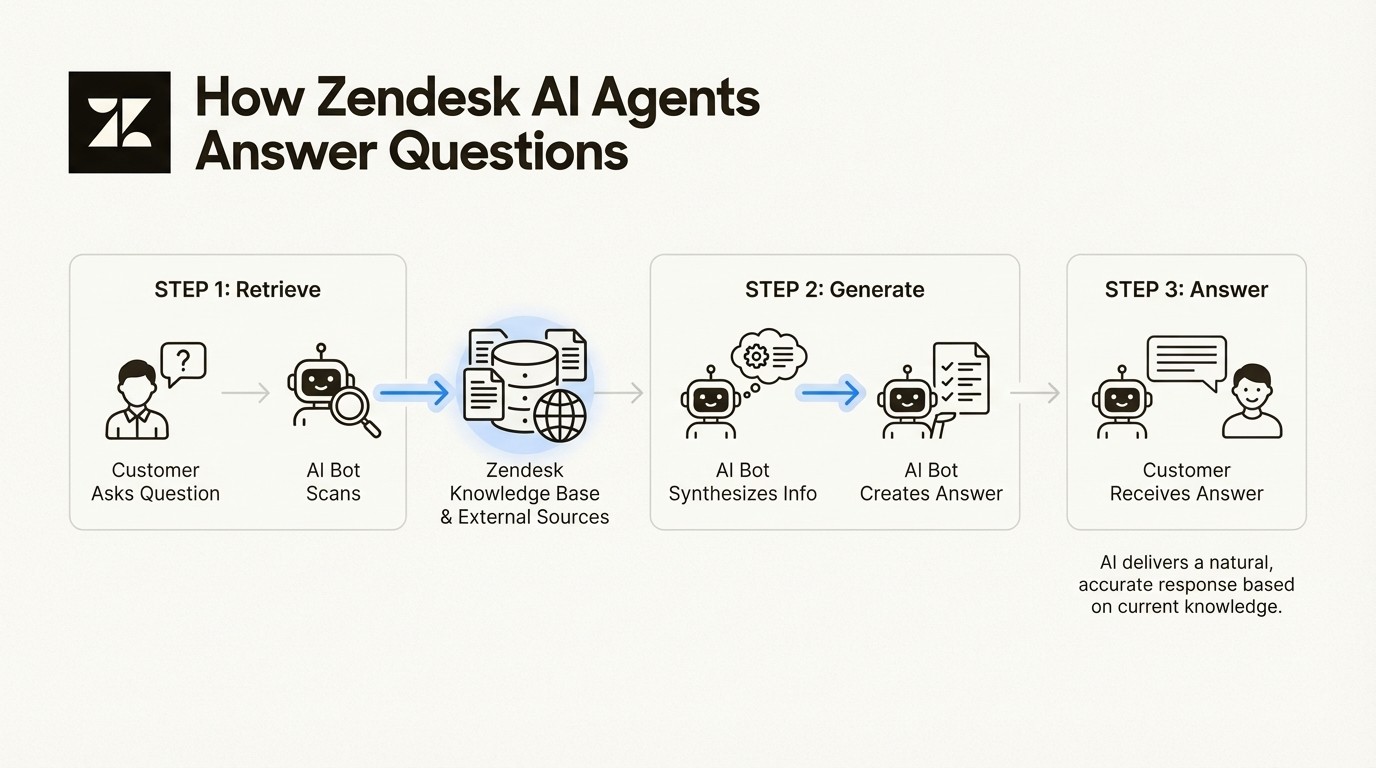
An infographic showing how Zendesk AI agents use Retrieval-Augmented Generation (RAG) to answer customer questions by retrieving information and generating a response.
The easiest way to picture it is like an open-book exam. The AI can only use the "book" you give it. If that book is from five years ago, with notes about features that no longer exist, its answers will be incorrect.
Zendesk AI agents rely heavily on this RAG model. By default, their main "book" is your Help Center. But here’s the important part: Zendesk knows your knowledge might be stored elsewhere. That's why you can connect external knowledge sources to your AI agent, including a Confluence space. This makes the accuracy of that content absolutely critical. In fact, Zendesk even claims that connecting your AI to a solid knowledge source can help you "start automating 30% of requests from day one." But that only happens if the knowledge is correct.
The hidden cost of an outdated knowledge base
When your AI is working with bad information, the fallout is more than just a few wrong answers. It creates a domino effect that can hurt customer trust, lower agent morale, and undermine the return on your AI investment. You might have been promised a 301% ROI from Zendesk, but that figure assumes the AI is actually solving problems, not creating new ones.
Inaccurate resolutions and customer trust
An AI using outdated knowledge will confidently give customers wrong information. It might tell them about an old pricing plan, a feature that was removed six months ago, or a return policy you changed last year.
What happens next? The customer follows the AI's advice, it doesn't work, and they get frustrated. They don't just lose faith in the bot; they lose trust in your company. A bad AI experience can feel dismissive, which is often worse than having no AI at all. Instead of building the trust Zendesk aims for with its AI, it can have the opposite effect. This can lead to automating customer frustration rather than providing help.
Increased agent workload and ticket escalations
An outdated AI can inadvertently increase agent workload.
This workflow typically looks like this:
A customer asks the AI a question.
The AI provides a confident but incorrect answer based on an old article.
The customer, now confused and annoyed, ditches the bot and opens a ticket to talk to a person.
A human agent then has to spend time not just solving the original problem, but also correcting the AI's mistake and calming down an irritated customer.
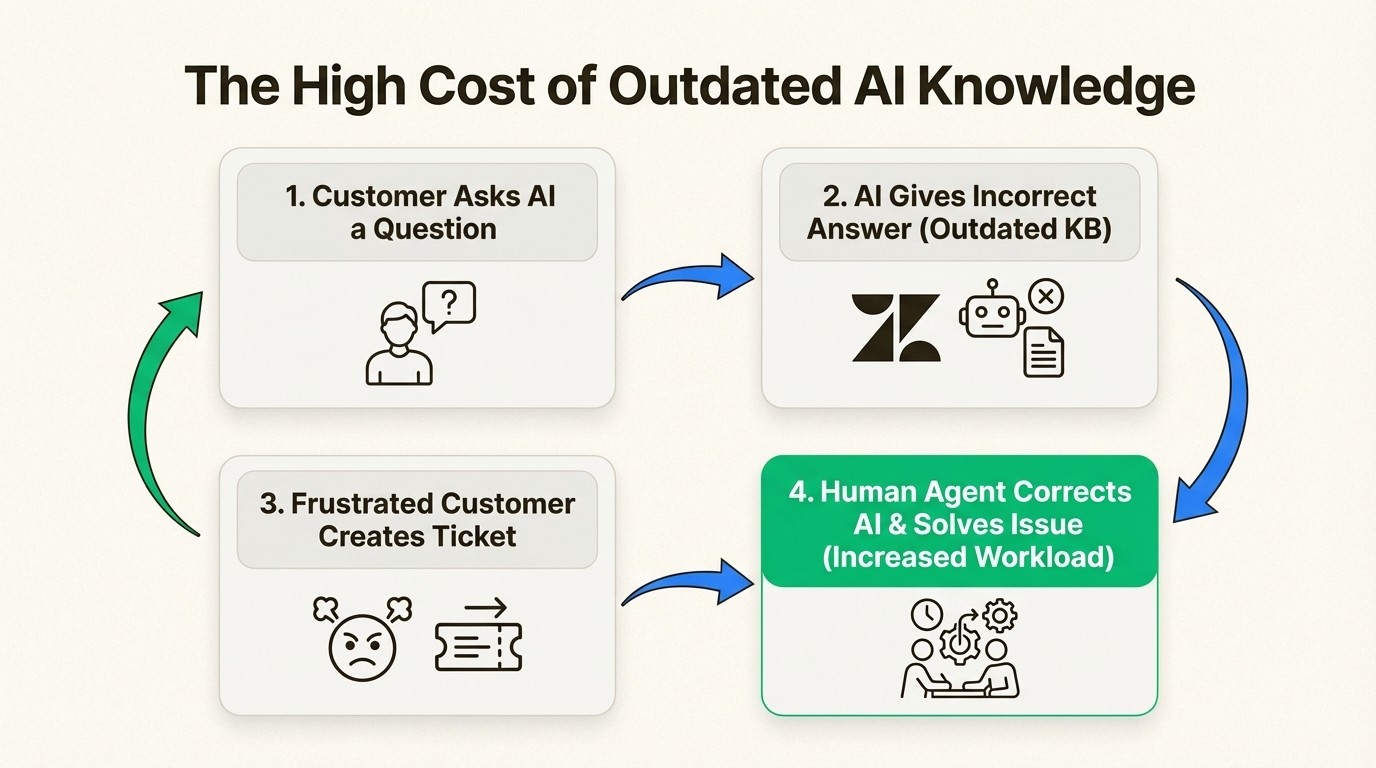
A workflow diagram illustrating how an outdated AI knowledge base leads to incorrect answers, customer frustration, and increased workload for human agents.
This completely undermines the value of Zendesk's ticketing system, which is supposed to streamline work and help agents be more productive. Instead, your team may spend more time on damage control, correcting the AI's errors.
The single source of truth problem
Keeping a knowledge base perfectly updated can be challenging, especially for growing companies. New features are launching, policies are changing, and best practices are always being tweaked.
The reality for most companies is that the real, up-to-the-minute knowledge doesn't live in the customer-facing help center. It's being created and updated by subject matter experts, like engineers and product managers, in their own collaborative tools. For many, that tool is Confluence, which Atlassian calls the central hub for team knowledge, or a "single source of truth (SSoT)".
The problem starts when there's a delay in getting that expert knowledge from Confluence into Zendesk. This manual copy-and-paste process can create a lag of weeks or even months. During that time, your AI operates with outdated information, out of sync with your product.
Connecting your knowledge sources
The solution lies in creating a more efficient workflow where your collaborative knowledge source is automatically synced with Zendesk. Zendesk already allows you to connect with Confluence spaces, which opens the door for an improved approach.
Challenges of managing knowledge in Zendesk
Even with its helpful features, using Zendesk Guide for content creation can present challenges, especially when you're trying to keep up with constant changes. The platform has generative AI tools to help writers expand, simplify, or change the tone of articles, but certain workflow aspects can be difficult.
Collaboration hurdles
Zendesk Guide is built mainly for publishing, not for collaborative drafting. It's great for formatting and organizing finished articles, but it’s not where your teams naturally work together. Your subject matter experts, like engineers and product managers, are already working in tools built for that purpose, like Atlassian Confluence. Requiring them to switch tools just to write down what they know can create friction and slow everything down. Contributors may be less likely to contribute if it means learning another platform.
The "two sources of truth" problem
This workflow almost always creates two separate sources of information. You have the detailed, internal documents where your teams are working in Confluence, and then you have the public customer knowledge in Zendesk. The support team is left in the middle, manually trying to keep the two in sync. This manual process can be prone to failure. It leads to "content drift," where the Zendesk articles slowly become outdated. This can make it difficult to create a single source of truth that everyone, including your AI, can count on.
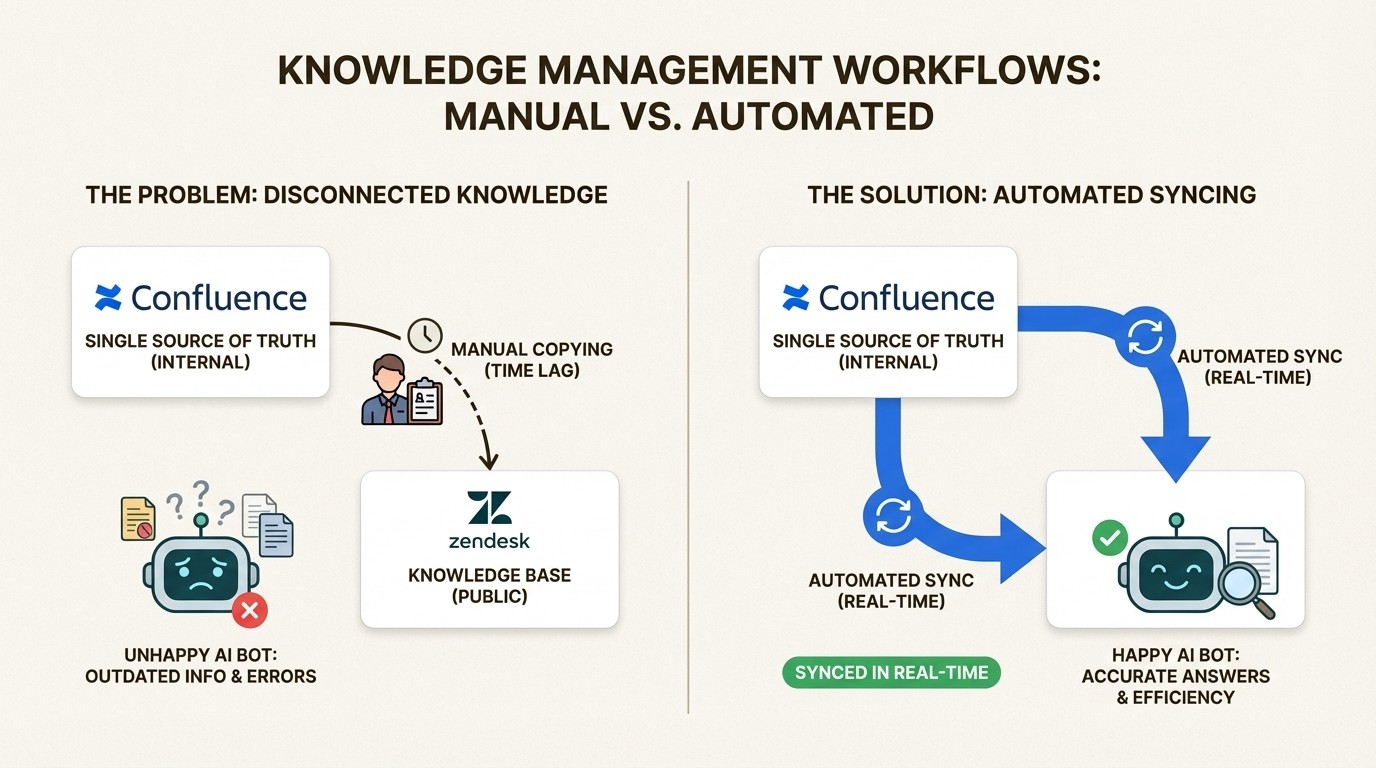
A comparison showing the inefficient, disconnected workflow of manually updating a knowledge base versus the efficient, automated syncing from a single source of truth like Confluence.
Workflow inefficiencies
The manual process of moving content from Confluence to Zendesk can be time-consuming. It involves copying, pasting, and reformatting, which can lead to errors like broken images or scrambled tables. These challenges can discourage frequent updates, turning knowledge management into a reactive task rather than a proactive one.
How automated syncing keeps your knowledge base updated
This is where automation can improve the workflow. Instead of requiring teams to leave their preferred tools, knowledge can be brought to where it's needed automatically. An app like Sync for Confluence is designed to address this problem.
The idea is simple: let your team keep using Confluence, a tool for collaboration, as their single source of truth. Then, the app automatically and continuously syncs that knowledge directly to your Zendesk Help Center.
Here are the key benefits of this setup:
Empower Subject Matter Experts: Your product teams and developers can write and update knowledge in the tool they already use every day: Confluence. This allows them to contribute within their existing workflow, which means they’re far more likely to contribute and keep things fresh. This fits right in with Atlassian's philosophy of using Confluence to "create more together".
Maintain a Single Source of Truth: This workflow helps prevent content drift. When a document is updated in Confluence, it’s automatically updated in Zendesk. This ensures your internal teams, support agents, and customers are all looking at the same information, which means consistency and accuracy for everyone.
Automate the Publishing Workflow: The app handles the sync for you, instantly and reliably. It removes the manual copy-paste-reformat process, which saves your support team tons of time and cuts down on human error. This is how you make sure your Zendesk KB is always up to date for your AI agents.
Smarter, More Trustworthy AI: This is the ultimate goal. By feeding your Zendesk AI a constant, real-time stream of fresh, expert-approved knowledge, you can significantly improve its accuracy. Your AI can become a more reliable asset that customers can trust to give them the right answer on the first try.
To see how Zendesk's AI agents work in practice and understand the importance of the knowledge they're connected to, check out this overview from Zendesk.
This overview from Zendesk explains how their AI agents work and the importance of connecting them to high-quality knowledge sources.
Ensuring your knowledge base is ready for AI agents
Ultimately, the success of your Zendesk AI agents boils down to one thing: the quality of the knowledge you give them. An AI is a powerful tool, but it can't share what it doesn't know.
We've seen how manual updates are slow, inefficient, and create a significant gap between what your company knows and what your AI can access. This gap leads to customer dissatisfaction and increased agent workload, and a poor return on your investment.
The solution is to move away from manual updates. By using Confluence for creating knowledge and Sync for Confluence for automated publishing, you create a reliable pipeline. This approach can lead to more effective AI agents and improved customer satisfaction, and your support team focused on solving the problems that truly need a human touch.
Ensure your AI runs on current information to power your Zendesk agents effectively.
Try Sync for Confluence and build a smarter, more reliable AI support system today.
Article
Keeping Your Zendesk Knowledge Base Updated for AI Agents
Make updates easy with Sync for Confluence
Zendesk AI agents come with a big promise: automating over 80% of customer chats with some pretty smart AI. Sounds amazing, right? But there's a catch that often gets overlooked until things go wrong: an AI agent is only as good as the information you feed it.
If your AI is working from an old playbook, it's going to give old answers. A knowledge base (KB) that's incomplete or stale can cause your AI to give out wrong information. This leads to unhappy customers and more work for your human agents. This can undermine the purpose of implementing an AI solution.
This guide will break down why keeping your knowledge base fresh isn't just a "nice-to-have" anymore. For modern AI like Zendesk's, it's essential. We'll also explore a more efficient way to make sure your AI is always working with the best, most current info your team has.
How AI agents use your knowledge base
How does an AI come up with an answer? The tech behind most modern AI, including what Zendesk uses, is called Retrieval-Augmented Generation, or RAG. It sounds technical, but the idea is pretty straightforward.
As Zendesk explains, they use technologies like RAG to make sure AI responses are grounded in the content you provide. It’s a simple two-step process:
Retrieve: When a customer asks something, the AI quickly scans your knowledge source (like your Zendesk Help Center) to find the most relevant bits of information.
Generate: It then uses that info to piece together a natural, human-sounding answer.
An infographic showing how Zendesk AI agents use Retrieval-Augmented Generation (RAG) to answer customer questions by retrieving information and generating a response.
The easiest way to picture it is like an open-book exam. The AI can only use the "book" you give it. If that book is from five years ago, with notes about features that no longer exist, its answers will be incorrect.
Zendesk AI agents rely heavily on this RAG model. By default, their main "book" is your Help Center. But here’s the important part: Zendesk knows your knowledge might be stored elsewhere. That's why you can connect external knowledge sources to your AI agent, including a Confluence space. This makes the accuracy of that content absolutely critical. In fact, Zendesk even claims that connecting your AI to a solid knowledge source can help you "start automating 30% of requests from day one." But that only happens if the knowledge is correct.
The hidden cost of an outdated knowledge base
When your AI is working with bad information, the fallout is more than just a few wrong answers. It creates a domino effect that can hurt customer trust, lower agent morale, and undermine the return on your AI investment. You might have been promised a 301% ROI from Zendesk, but that figure assumes the AI is actually solving problems, not creating new ones.
Inaccurate resolutions and customer trust
An AI using outdated knowledge will confidently give customers wrong information. It might tell them about an old pricing plan, a feature that was removed six months ago, or a return policy you changed last year.
What happens next? The customer follows the AI's advice, it doesn't work, and they get frustrated. They don't just lose faith in the bot; they lose trust in your company. A bad AI experience can feel dismissive, which is often worse than having no AI at all. Instead of building the trust Zendesk aims for with its AI, it can have the opposite effect. This can lead to automating customer frustration rather than providing help.
Increased agent workload and ticket escalations
An outdated AI can inadvertently increase agent workload.
This workflow typically looks like this:
A customer asks the AI a question.
The AI provides a confident but incorrect answer based on an old article.
The customer, now confused and annoyed, ditches the bot and opens a ticket to talk to a person.
A human agent then has to spend time not just solving the original problem, but also correcting the AI's mistake and calming down an irritated customer.
A workflow diagram illustrating how an outdated AI knowledge base leads to incorrect answers, customer frustration, and increased workload for human agents.
This completely undermines the value of Zendesk's ticketing system, which is supposed to streamline work and help agents be more productive. Instead, your team may spend more time on damage control, correcting the AI's errors.
The single source of truth problem
Keeping a knowledge base perfectly updated can be challenging, especially for growing companies. New features are launching, policies are changing, and best practices are always being tweaked.
The reality for most companies is that the real, up-to-the-minute knowledge doesn't live in the customer-facing help center. It's being created and updated by subject matter experts, like engineers and product managers, in their own collaborative tools. For many, that tool is Confluence, which Atlassian calls the central hub for team knowledge, or a "single source of truth (SSoT)".
The problem starts when there's a delay in getting that expert knowledge from Confluence into Zendesk. This manual copy-and-paste process can create a lag of weeks or even months. During that time, your AI operates with outdated information, out of sync with your product.
Connecting your knowledge sources
The solution lies in creating a more efficient workflow where your collaborative knowledge source is automatically synced with Zendesk. Zendesk already allows you to connect with Confluence spaces, which opens the door for an improved approach.
Challenges of managing knowledge in Zendesk
Even with its helpful features, using Zendesk Guide for content creation can present challenges, especially when you're trying to keep up with constant changes. The platform has generative AI tools to help writers expand, simplify, or change the tone of articles, but certain workflow aspects can be difficult.
Collaboration hurdles
Zendesk Guide is built mainly for publishing, not for collaborative drafting. It's great for formatting and organizing finished articles, but it’s not where your teams naturally work together. Your subject matter experts, like engineers and product managers, are already working in tools built for that purpose, like Atlassian Confluence. Requiring them to switch tools just to write down what they know can create friction and slow everything down. Contributors may be less likely to contribute if it means learning another platform.
The "two sources of truth" problem
This workflow almost always creates two separate sources of information. You have the detailed, internal documents where your teams are working in Confluence, and then you have the public customer knowledge in Zendesk. The support team is left in the middle, manually trying to keep the two in sync. This manual process can be prone to failure. It leads to "content drift," where the Zendesk articles slowly become outdated. This can make it difficult to create a single source of truth that everyone, including your AI, can count on.
A comparison showing the inefficient, disconnected workflow of manually updating a knowledge base versus the efficient, automated syncing from a single source of truth like Confluence.
Workflow inefficiencies
The manual process of moving content from Confluence to Zendesk can be time-consuming. It involves copying, pasting, and reformatting, which can lead to errors like broken images or scrambled tables. These challenges can discourage frequent updates, turning knowledge management into a reactive task rather than a proactive one.
How automated syncing keeps your knowledge base updated
This is where automation can improve the workflow. Instead of requiring teams to leave their preferred tools, knowledge can be brought to where it's needed automatically. An app like Sync for Confluence is designed to address this problem.
The idea is simple: let your team keep using Confluence, a tool for collaboration, as their single source of truth. Then, the app automatically and continuously syncs that knowledge directly to your Zendesk Help Center.
Here are the key benefits of this setup:
Empower Subject Matter Experts: Your product teams and developers can write and update knowledge in the tool they already use every day: Confluence. This allows them to contribute within their existing workflow, which means they’re far more likely to contribute and keep things fresh. This fits right in with Atlassian's philosophy of using Confluence to "create more together".
Maintain a Single Source of Truth: This workflow helps prevent content drift. When a document is updated in Confluence, it’s automatically updated in Zendesk. This ensures your internal teams, support agents, and customers are all looking at the same information, which means consistency and accuracy for everyone.
Automate the Publishing Workflow: The app handles the sync for you, instantly and reliably. It removes the manual copy-paste-reformat process, which saves your support team tons of time and cuts down on human error. This is how you make sure your Zendesk KB is always up to date for your AI agents.
Smarter, More Trustworthy AI: This is the ultimate goal. By feeding your Zendesk AI a constant, real-time stream of fresh, expert-approved knowledge, you can significantly improve its accuracy. Your AI can become a more reliable asset that customers can trust to give them the right answer on the first try.
To see how Zendesk's AI agents work in practice and understand the importance of the knowledge they're connected to, check out this overview from Zendesk.
This overview from Zendesk explains how their AI agents work and the importance of connecting them to high-quality knowledge sources.
Ensuring your knowledge base is ready for AI agents
Ultimately, the success of your Zendesk AI agents boils down to one thing: the quality of the knowledge you give them. An AI is a powerful tool, but it can't share what it doesn't know.
We've seen how manual updates are slow, inefficient, and create a significant gap between what your company knows and what your AI can access. This gap leads to customer dissatisfaction and increased agent workload, and a poor return on your investment.
The solution is to move away from manual updates. By using Confluence for creating knowledge and Sync for Confluence for automated publishing, you create a reliable pipeline. This approach can lead to more effective AI agents and improved customer satisfaction, and your support team focused on solving the problems that truly need a human touch.
Ensure your AI runs on current information to power your Zendesk agents effectively.
Try Sync for Confluence and build a smarter, more reliable AI support system today.
Article
Keeping Your Zendesk Knowledge Base Updated for AI Agents
Make updates easy with Sync for Confluence
Zendesk AI agents come with a big promise: automating over 80% of customer chats with some pretty smart AI. Sounds amazing, right? But there's a catch that often gets overlooked until things go wrong: an AI agent is only as good as the information you feed it.
If your AI is working from an old playbook, it's going to give old answers. A knowledge base (KB) that's incomplete or stale can cause your AI to give out wrong information. This leads to unhappy customers and more work for your human agents. This can undermine the purpose of implementing an AI solution.
This guide will break down why keeping your knowledge base fresh isn't just a "nice-to-have" anymore. For modern AI like Zendesk's, it's essential. We'll also explore a more efficient way to make sure your AI is always working with the best, most current info your team has.
How AI agents use your knowledge base
How does an AI come up with an answer? The tech behind most modern AI, including what Zendesk uses, is called Retrieval-Augmented Generation, or RAG. It sounds technical, but the idea is pretty straightforward.
As Zendesk explains, they use technologies like RAG to make sure AI responses are grounded in the content you provide. It’s a simple two-step process:
Retrieve: When a customer asks something, the AI quickly scans your knowledge source (like your Zendesk Help Center) to find the most relevant bits of information.
Generate: It then uses that info to piece together a natural, human-sounding answer.
An infographic showing how Zendesk AI agents use Retrieval-Augmented Generation (RAG) to answer customer questions by retrieving information and generating a response.
The easiest way to picture it is like an open-book exam. The AI can only use the "book" you give it. If that book is from five years ago, with notes about features that no longer exist, its answers will be incorrect.
Zendesk AI agents rely heavily on this RAG model. By default, their main "book" is your Help Center. But here’s the important part: Zendesk knows your knowledge might be stored elsewhere. That's why you can connect external knowledge sources to your AI agent, including a Confluence space. This makes the accuracy of that content absolutely critical. In fact, Zendesk even claims that connecting your AI to a solid knowledge source can help you "start automating 30% of requests from day one." But that only happens if the knowledge is correct.
The hidden cost of an outdated knowledge base
When your AI is working with bad information, the fallout is more than just a few wrong answers. It creates a domino effect that can hurt customer trust, lower agent morale, and undermine the return on your AI investment. You might have been promised a 301% ROI from Zendesk, but that figure assumes the AI is actually solving problems, not creating new ones.
Inaccurate resolutions and customer trust
An AI using outdated knowledge will confidently give customers wrong information. It might tell them about an old pricing plan, a feature that was removed six months ago, or a return policy you changed last year.
What happens next? The customer follows the AI's advice, it doesn't work, and they get frustrated. They don't just lose faith in the bot; they lose trust in your company. A bad AI experience can feel dismissive, which is often worse than having no AI at all. Instead of building the trust Zendesk aims for with its AI, it can have the opposite effect. This can lead to automating customer frustration rather than providing help.
Increased agent workload and ticket escalations
An outdated AI can inadvertently increase agent workload.
This workflow typically looks like this:
A customer asks the AI a question.
The AI provides a confident but incorrect answer based on an old article.
The customer, now confused and annoyed, ditches the bot and opens a ticket to talk to a person.
A human agent then has to spend time not just solving the original problem, but also correcting the AI's mistake and calming down an irritated customer.
A workflow diagram illustrating how an outdated AI knowledge base leads to incorrect answers, customer frustration, and increased workload for human agents.
This completely undermines the value of Zendesk's ticketing system, which is supposed to streamline work and help agents be more productive. Instead, your team may spend more time on damage control, correcting the AI's errors.
The single source of truth problem
Keeping a knowledge base perfectly updated can be challenging, especially for growing companies. New features are launching, policies are changing, and best practices are always being tweaked.
The reality for most companies is that the real, up-to-the-minute knowledge doesn't live in the customer-facing help center. It's being created and updated by subject matter experts, like engineers and product managers, in their own collaborative tools. For many, that tool is Confluence, which Atlassian calls the central hub for team knowledge, or a "single source of truth (SSoT)".
The problem starts when there's a delay in getting that expert knowledge from Confluence into Zendesk. This manual copy-and-paste process can create a lag of weeks or even months. During that time, your AI operates with outdated information, out of sync with your product.
Connecting your knowledge sources
The solution lies in creating a more efficient workflow where your collaborative knowledge source is automatically synced with Zendesk. Zendesk already allows you to connect with Confluence spaces, which opens the door for an improved approach.
Challenges of managing knowledge in Zendesk
Even with its helpful features, using Zendesk Guide for content creation can present challenges, especially when you're trying to keep up with constant changes. The platform has generative AI tools to help writers expand, simplify, or change the tone of articles, but certain workflow aspects can be difficult.
Collaboration hurdles
Zendesk Guide is built mainly for publishing, not for collaborative drafting. It's great for formatting and organizing finished articles, but it’s not where your teams naturally work together. Your subject matter experts, like engineers and product managers, are already working in tools built for that purpose, like Atlassian Confluence. Requiring them to switch tools just to write down what they know can create friction and slow everything down. Contributors may be less likely to contribute if it means learning another platform.
The "two sources of truth" problem
This workflow almost always creates two separate sources of information. You have the detailed, internal documents where your teams are working in Confluence, and then you have the public customer knowledge in Zendesk. The support team is left in the middle, manually trying to keep the two in sync. This manual process can be prone to failure. It leads to "content drift," where the Zendesk articles slowly become outdated. This can make it difficult to create a single source of truth that everyone, including your AI, can count on.
A comparison showing the inefficient, disconnected workflow of manually updating a knowledge base versus the efficient, automated syncing from a single source of truth like Confluence.
Workflow inefficiencies
The manual process of moving content from Confluence to Zendesk can be time-consuming. It involves copying, pasting, and reformatting, which can lead to errors like broken images or scrambled tables. These challenges can discourage frequent updates, turning knowledge management into a reactive task rather than a proactive one.
How automated syncing keeps your knowledge base updated
This is where automation can improve the workflow. Instead of requiring teams to leave their preferred tools, knowledge can be brought to where it's needed automatically. An app like Sync for Confluence is designed to address this problem.
The idea is simple: let your team keep using Confluence, a tool for collaboration, as their single source of truth. Then, the app automatically and continuously syncs that knowledge directly to your Zendesk Help Center.
Here are the key benefits of this setup:
Empower Subject Matter Experts: Your product teams and developers can write and update knowledge in the tool they already use every day: Confluence. This allows them to contribute within their existing workflow, which means they’re far more likely to contribute and keep things fresh. This fits right in with Atlassian's philosophy of using Confluence to "create more together".
Maintain a Single Source of Truth: This workflow helps prevent content drift. When a document is updated in Confluence, it’s automatically updated in Zendesk. This ensures your internal teams, support agents, and customers are all looking at the same information, which means consistency and accuracy for everyone.
Automate the Publishing Workflow: The app handles the sync for you, instantly and reliably. It removes the manual copy-paste-reformat process, which saves your support team tons of time and cuts down on human error. This is how you make sure your Zendesk KB is always up to date for your AI agents.
Smarter, More Trustworthy AI: This is the ultimate goal. By feeding your Zendesk AI a constant, real-time stream of fresh, expert-approved knowledge, you can significantly improve its accuracy. Your AI can become a more reliable asset that customers can trust to give them the right answer on the first try.
To see how Zendesk's AI agents work in practice and understand the importance of the knowledge they're connected to, check out this overview from Zendesk.
This overview from Zendesk explains how their AI agents work and the importance of connecting them to high-quality knowledge sources.
Ensuring your knowledge base is ready for AI agents
Ultimately, the success of your Zendesk AI agents boils down to one thing: the quality of the knowledge you give them. An AI is a powerful tool, but it can't share what it doesn't know.
We've seen how manual updates are slow, inefficient, and create a significant gap between what your company knows and what your AI can access. This gap leads to customer dissatisfaction and increased agent workload, and a poor return on your investment.
The solution is to move away from manual updates. By using Confluence for creating knowledge and Sync for Confluence for automated publishing, you create a reliable pipeline. This approach can lead to more effective AI agents and improved customer satisfaction, and your support team focused on solving the problems that truly need a human touch.
Ensure your AI runs on current information to power your Zendesk agents effectively.
Try Sync for Confluence and build a smarter, more reliable AI support system today.
Use cases
Resources
Backed by


Use cases
Backed by
Use cases
Resources
Backed by