Article
Why Your Productboard to Jira Integration Feels Like a Chore
Stop fighting your sync. Start automating your updates.


Product managers often adopt Productboard to escape the structural rigidity of Jira. The promise is a dedicated space for discovery and strategy that feeds into the delivery engine. However, for many teams, the reality eventually shifts from "strategic alignment" to "data janitorship."
Instead of spending time with customers or refining the vision, you find yourself auditing status mappings and wondering why a feature marked "Shipped" in Jira is still sitting in "In Progress" on your roadmap. This friction isn't a lack of discipline on your part; it is a fundamental technical mismatch between two competing sources of truth.
Why does the Productboard-Jira sync require constant maintenance?
The core of the issue is that Productboard and Jira were built on two fundamentally different data schemas. Productboard is a hierarchical tool designed for flexible grouping; Jira is a relational database designed for rigid, linear workflows and granular issue tracking.
When you connect the two, you aren't just linking tools—you are trying to force two different languages to stay in a constant, real-time conversation. This "bi-directional sync" is often marketed as a productivity feature, but in practice, it acts as a technical debt generator. It requires the product manager to act as the manual bridge between "the plan" and "the work."
The manual overhead of status mapping
Jira is notoriously customizable. Your engineering team might use a workflow that includes "In Review," "Ready for QA," and "Staging." Productboard, however, usually operates on higher-level milestones like "Discovery," "Building," and "Launched."
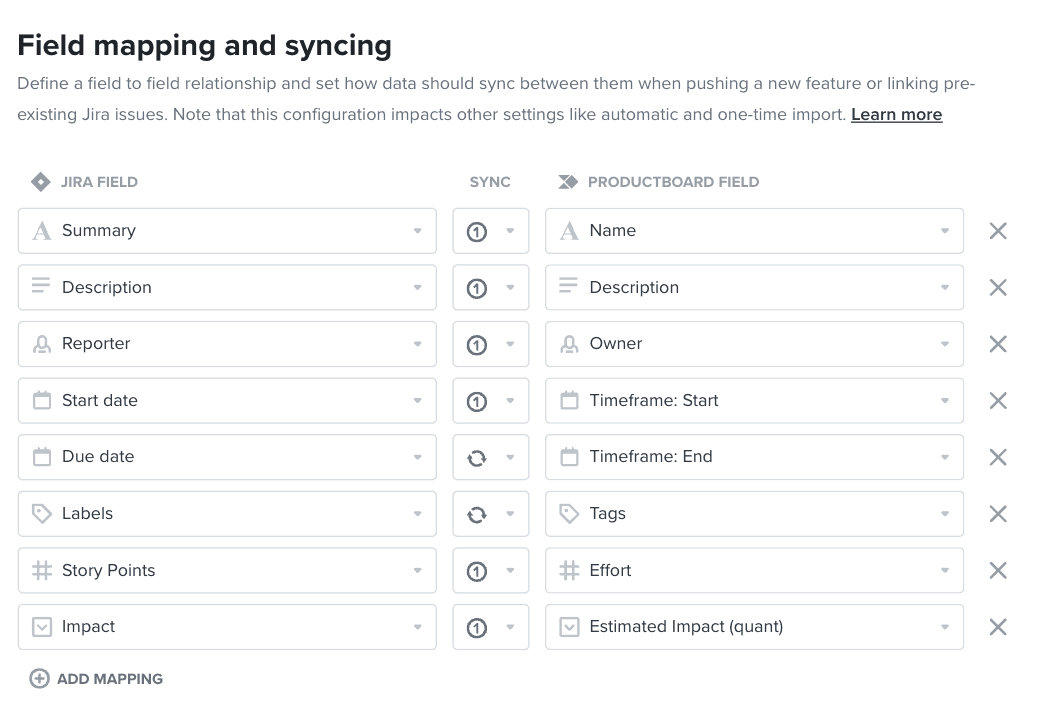
Maintaining this mapping is a manual chore. Every time a lead developer adds a new transition state to a Jira project, your integration risks breaking. If the mapping isn't updated immediately, your internal product updates become inaccurate. You are no longer just a PM; you are a part-time integration architect, constantly fixing the plumbing to ensure stakeholders aren't looking at stale information.
The problem of "Data Drift"
"Data Drift" occurs when the volume of tickets, sub-tasks, and technical spikes becomes so high that the data becomes unreliable for anyone outside the immediate engineering team. When you sync Productboard to Jira, you often export high-level ideas that turn into Epics.
Over time, as scopes creep and tickets are moved, split, or renamed, the link between the "Idea" in Productboard and the "Reality" in Jira begins to fray. The sync might tell you the Epic is 80% done, but in reality, the team has pivoted, and the original "Feature" in Productboard is now an obsolete ghost of the initial plan.
Think of it like this: Productboard is the architectural blueprint, and Jira is the active construction site. In a perfect world, the blueprint updates as the building goes up. In reality, the foreman (Engineering) makes changes on the ground—moving a wall here, adding a socket there—that the architect (Product) doesn't see until the wall is already in the wrong place. Eventually, the blueprint is just a piece of paper that no longer matches the building.
Productboard vs. Jira-Native Apps
Many teams don't account for the "hidden" hours spent keeping Productboard in sync. Below is a breakdown of the manual tasks required to keep a Productboard-Jira integration healthy compared to an automated approach using an app built specifically for Jira, like Released.
Maintenance Task | Productboard (External Sync) | Jira-Native App (Released) |
Status Alignment | Manual mapping of Jira transitions to PB status. | Inherits Jira statuses automatically in real-time. |
Field Syncing | Mapping custom fields (points, labels) across platforms. | Reads directly from existing Jira metadata. |
Stakeholder Updates | Manually pushing updates to a Portal or Product Roadmap. | Automated triggers based on Jira "Done" status. |
Permissioning | Managing separate user seats and access levels. | Uses existing Jira and Atlassian permissions. |
Data Cleanup | Deleting "Ghost" features in PB closed in Jira. | Real-time reflection of the active Jira board. |
When is Productboard the wrong tool for the job?
Productboard is an expansive tool for deep discovery. However, it becomes a liability when it is used primarily as a communication layer for stakeholders. If your primary goal is to show the business what is being built and what has recently shipped, Productboard adds a layer of "middleware" that complicates the process.
Productboard is right for: Large organizations with complex, multi-product hierarchies that need a disconnected sandbox for multi-year planning.
A Jira-Native workflow is right for: Product-led teams who want a simple way to separate product planning and communication from delivery, without the manual sync overhead.
The risk of "Double Entry"
The moment a PM has to type the same sentence in two different places—once for the developers in a Jira Epic and once for the stakeholders in a Productboard Feature—the system has failed. This double entry is where errors creep in. When you are tired or rushed, you will inevitably update Jira but forget to update Productboard. Suddenly, your stakeholders are looking at stale data, and trust in your roadmap begins to erode.
How to move from "Syncing" to "Publishing"
Reporting should be a byproduct of your work, not a separate task on your Friday afternoon to-do list. The shift away from Productboard maintenance involves keeping your strategy where the work happens. By using Jira Product Discovery (JPD) for your ideas and Jira for delivery, you eliminate the "translation" layer.
However, you still need to package that raw Jira data for people who don't live in tickets. This is where Released changes the workflow. As an app built for the Jira ecosystem, it doesn't "sync" your data; it reads it.
Moving an idea from JPD into a Jira Epic
In a modern Atlassian workflow, you use Jira Product Discovery to vet ideas. Once an idea is validated, it moves into a Jira Epic, Story or Task. In a Productboard world, you would now have to ensure that Epic is linked back to the original PB Feature and that all statuses are aligned.
With Released, the workflow is linear. You flag the Epic or the labels you want to track. As your developers move tickets to "Done," Released captures that data. It uses AI release notes to parse the technical jargon in your Jira tickets and transform it into a polished, stakeholder-ready update.
Turning Work-in-Progress into Public Roadmaps
The greatest strength of Released is its ability to filter the "noise" of Jira. You don't want stakeholders seeing every sub-task or bug fix. Released allows you to curate the "signals"—the big wins and the feature launches—and package them into a beautiful, public-facing Roadmaps and Changelog.
If you remember one thing, make it this: Your roadmap should be a reflection of your actual progress, not an additional project you have to manage.
Conclusion
The "chore" of the Productboard-Jira integration is a structural mismatch. If you find yourself spending more time fixing your roadmap than talking to users, it’s time to stop syncing and start publishing.
By using Released, you eliminate the middleman. You keep your developers in Jira, your strategy in JPD, and your stakeholders informed via automated, polished updates that require zero manual status mapping.
Article
Why Your Productboard to Jira Integration Feels Like a Chore
Stop fighting your sync. Start automating your updates.
Product managers often adopt Productboard to escape the structural rigidity of Jira. The promise is a dedicated space for discovery and strategy that feeds into the delivery engine. However, for many teams, the reality eventually shifts from "strategic alignment" to "data janitorship."
Instead of spending time with customers or refining the vision, you find yourself auditing status mappings and wondering why a feature marked "Shipped" in Jira is still sitting in "In Progress" on your roadmap. This friction isn't a lack of discipline on your part; it is a fundamental technical mismatch between two competing sources of truth.
Why does the Productboard-Jira sync require constant maintenance?
The core of the issue is that Productboard and Jira were built on two fundamentally different data schemas. Productboard is a hierarchical tool designed for flexible grouping; Jira is a relational database designed for rigid, linear workflows and granular issue tracking.
When you connect the two, you aren't just linking tools—you are trying to force two different languages to stay in a constant, real-time conversation. This "bi-directional sync" is often marketed as a productivity feature, but in practice, it acts as a technical debt generator. It requires the product manager to act as the manual bridge between "the plan" and "the work."
The manual overhead of status mapping
Jira is notoriously customizable. Your engineering team might use a workflow that includes "In Review," "Ready for QA," and "Staging." Productboard, however, usually operates on higher-level milestones like "Discovery," "Building," and "Launched."
Maintaining this mapping is a manual chore. Every time a lead developer adds a new transition state to a Jira project, your integration risks breaking. If the mapping isn't updated immediately, your internal product updates become inaccurate. You are no longer just a PM; you are a part-time integration architect, constantly fixing the plumbing to ensure stakeholders aren't looking at stale information.
The problem of "Data Drift"
"Data Drift" occurs when the volume of tickets, sub-tasks, and technical spikes becomes so high that the data becomes unreliable for anyone outside the immediate engineering team. When you sync Productboard to Jira, you often export high-level ideas that turn into Epics.
Over time, as scopes creep and tickets are moved, split, or renamed, the link between the "Idea" in Productboard and the "Reality" in Jira begins to fray. The sync might tell you the Epic is 80% done, but in reality, the team has pivoted, and the original "Feature" in Productboard is now an obsolete ghost of the initial plan.
Think of it like this: Productboard is the architectural blueprint, and Jira is the active construction site. In a perfect world, the blueprint updates as the building goes up. In reality, the foreman (Engineering) makes changes on the ground—moving a wall here, adding a socket there—that the architect (Product) doesn't see until the wall is already in the wrong place. Eventually, the blueprint is just a piece of paper that no longer matches the building.
Productboard vs. Jira-Native Apps
Many teams don't account for the "hidden" hours spent keeping Productboard in sync. Below is a breakdown of the manual tasks required to keep a Productboard-Jira integration healthy compared to an automated approach using an app built specifically for Jira, like Released.
Maintenance Task | Productboard (External Sync) | Jira-Native App (Released) |
Status Alignment | Manual mapping of Jira transitions to PB status. | Inherits Jira statuses automatically in real-time. |
Field Syncing | Mapping custom fields (points, labels) across platforms. | Reads directly from existing Jira metadata. |
Stakeholder Updates | Manually pushing updates to a Portal or Product Roadmap. | Automated triggers based on Jira "Done" status. |
Permissioning | Managing separate user seats and access levels. | Uses existing Jira and Atlassian permissions. |
Data Cleanup | Deleting "Ghost" features in PB closed in Jira. | Real-time reflection of the active Jira board. |
When is Productboard the wrong tool for the job?
Productboard is an expansive tool for deep discovery. However, it becomes a liability when it is used primarily as a communication layer for stakeholders. If your primary goal is to show the business what is being built and what has recently shipped, Productboard adds a layer of "middleware" that complicates the process.
Productboard is right for: Large organizations with complex, multi-product hierarchies that need a disconnected sandbox for multi-year planning.
A Jira-Native workflow is right for: Product-led teams who want a simple way to separate product planning and communication from delivery, without the manual sync overhead.
The risk of "Double Entry"
The moment a PM has to type the same sentence in two different places—once for the developers in a Jira Epic and once for the stakeholders in a Productboard Feature—the system has failed. This double entry is where errors creep in. When you are tired or rushed, you will inevitably update Jira but forget to update Productboard. Suddenly, your stakeholders are looking at stale data, and trust in your roadmap begins to erode.
How to move from "Syncing" to "Publishing"
Reporting should be a byproduct of your work, not a separate task on your Friday afternoon to-do list. The shift away from Productboard maintenance involves keeping your strategy where the work happens. By using Jira Product Discovery (JPD) for your ideas and Jira for delivery, you eliminate the "translation" layer.
However, you still need to package that raw Jira data for people who don't live in tickets. This is where Released changes the workflow. As an app built for the Jira ecosystem, it doesn't "sync" your data; it reads it.
Moving an idea from JPD into a Jira Epic
In a modern Atlassian workflow, you use Jira Product Discovery to vet ideas. Once an idea is validated, it moves into a Jira Epic, Story or Task. In a Productboard world, you would now have to ensure that Epic is linked back to the original PB Feature and that all statuses are aligned.
With Released, the workflow is linear. You flag the Epic or the labels you want to track. As your developers move tickets to "Done," Released captures that data. It uses AI release notes to parse the technical jargon in your Jira tickets and transform it into a polished, stakeholder-ready update.
Turning Work-in-Progress into Public Roadmaps
The greatest strength of Released is its ability to filter the "noise" of Jira. You don't want stakeholders seeing every sub-task or bug fix. Released allows you to curate the "signals"—the big wins and the feature launches—and package them into a beautiful, public-facing Roadmaps and Changelog.
If you remember one thing, make it this: Your roadmap should be a reflection of your actual progress, not an additional project you have to manage.
Conclusion
The "chore" of the Productboard-Jira integration is a structural mismatch. If you find yourself spending more time fixing your roadmap than talking to users, it’s time to stop syncing and start publishing.
By using Released, you eliminate the middleman. You keep your developers in Jira, your strategy in JPD, and your stakeholders informed via automated, polished updates that require zero manual status mapping.
Article
Why Your Productboard to Jira Integration Feels Like a Chore
Stop fighting your sync. Start automating your updates.
Product managers often adopt Productboard to escape the structural rigidity of Jira. The promise is a dedicated space for discovery and strategy that feeds into the delivery engine. However, for many teams, the reality eventually shifts from "strategic alignment" to "data janitorship."
Instead of spending time with customers or refining the vision, you find yourself auditing status mappings and wondering why a feature marked "Shipped" in Jira is still sitting in "In Progress" on your roadmap. This friction isn't a lack of discipline on your part; it is a fundamental technical mismatch between two competing sources of truth.
Why does the Productboard-Jira sync require constant maintenance?
The core of the issue is that Productboard and Jira were built on two fundamentally different data schemas. Productboard is a hierarchical tool designed for flexible grouping; Jira is a relational database designed for rigid, linear workflows and granular issue tracking.
When you connect the two, you aren't just linking tools—you are trying to force two different languages to stay in a constant, real-time conversation. This "bi-directional sync" is often marketed as a productivity feature, but in practice, it acts as a technical debt generator. It requires the product manager to act as the manual bridge between "the plan" and "the work."
The manual overhead of status mapping
Jira is notoriously customizable. Your engineering team might use a workflow that includes "In Review," "Ready for QA," and "Staging." Productboard, however, usually operates on higher-level milestones like "Discovery," "Building," and "Launched."
Maintaining this mapping is a manual chore. Every time a lead developer adds a new transition state to a Jira project, your integration risks breaking. If the mapping isn't updated immediately, your internal product updates become inaccurate. You are no longer just a PM; you are a part-time integration architect, constantly fixing the plumbing to ensure stakeholders aren't looking at stale information.
The problem of "Data Drift"
"Data Drift" occurs when the volume of tickets, sub-tasks, and technical spikes becomes so high that the data becomes unreliable for anyone outside the immediate engineering team. When you sync Productboard to Jira, you often export high-level ideas that turn into Epics.
Over time, as scopes creep and tickets are moved, split, or renamed, the link between the "Idea" in Productboard and the "Reality" in Jira begins to fray. The sync might tell you the Epic is 80% done, but in reality, the team has pivoted, and the original "Feature" in Productboard is now an obsolete ghost of the initial plan.
Think of it like this: Productboard is the architectural blueprint, and Jira is the active construction site. In a perfect world, the blueprint updates as the building goes up. In reality, the foreman (Engineering) makes changes on the ground—moving a wall here, adding a socket there—that the architect (Product) doesn't see until the wall is already in the wrong place. Eventually, the blueprint is just a piece of paper that no longer matches the building.
Productboard vs. Jira-Native Apps
Many teams don't account for the "hidden" hours spent keeping Productboard in sync. Below is a breakdown of the manual tasks required to keep a Productboard-Jira integration healthy compared to an automated approach using an app built specifically for Jira, like Released.
Maintenance Task | Productboard (External Sync) | Jira-Native App (Released) |
Status Alignment | Manual mapping of Jira transitions to PB status. | Inherits Jira statuses automatically in real-time. |
Field Syncing | Mapping custom fields (points, labels) across platforms. | Reads directly from existing Jira metadata. |
Stakeholder Updates | Manually pushing updates to a Portal or Product Roadmap. | Automated triggers based on Jira "Done" status. |
Permissioning | Managing separate user seats and access levels. | Uses existing Jira and Atlassian permissions. |
Data Cleanup | Deleting "Ghost" features in PB closed in Jira. | Real-time reflection of the active Jira board. |
When is Productboard the wrong tool for the job?
Productboard is an expansive tool for deep discovery. However, it becomes a liability when it is used primarily as a communication layer for stakeholders. If your primary goal is to show the business what is being built and what has recently shipped, Productboard adds a layer of "middleware" that complicates the process.
Productboard is right for: Large organizations with complex, multi-product hierarchies that need a disconnected sandbox for multi-year planning.
A Jira-Native workflow is right for: Product-led teams who want a simple way to separate product planning and communication from delivery, without the manual sync overhead.
The risk of "Double Entry"
The moment a PM has to type the same sentence in two different places—once for the developers in a Jira Epic and once for the stakeholders in a Productboard Feature—the system has failed. This double entry is where errors creep in. When you are tired or rushed, you will inevitably update Jira but forget to update Productboard. Suddenly, your stakeholders are looking at stale data, and trust in your roadmap begins to erode.
How to move from "Syncing" to "Publishing"
Reporting should be a byproduct of your work, not a separate task on your Friday afternoon to-do list. The shift away from Productboard maintenance involves keeping your strategy where the work happens. By using Jira Product Discovery (JPD) for your ideas and Jira for delivery, you eliminate the "translation" layer.
However, you still need to package that raw Jira data for people who don't live in tickets. This is where Released changes the workflow. As an app built for the Jira ecosystem, it doesn't "sync" your data; it reads it.
Moving an idea from JPD into a Jira Epic
In a modern Atlassian workflow, you use Jira Product Discovery to vet ideas. Once an idea is validated, it moves into a Jira Epic, Story or Task. In a Productboard world, you would now have to ensure that Epic is linked back to the original PB Feature and that all statuses are aligned.
With Released, the workflow is linear. You flag the Epic or the labels you want to track. As your developers move tickets to "Done," Released captures that data. It uses AI release notes to parse the technical jargon in your Jira tickets and transform it into a polished, stakeholder-ready update.
Turning Work-in-Progress into Public Roadmaps
The greatest strength of Released is its ability to filter the "noise" of Jira. You don't want stakeholders seeing every sub-task or bug fix. Released allows you to curate the "signals"—the big wins and the feature launches—and package them into a beautiful, public-facing Roadmaps and Changelog.
If you remember one thing, make it this: Your roadmap should be a reflection of your actual progress, not an additional project you have to manage.
Conclusion
The "chore" of the Productboard-Jira integration is a structural mismatch. If you find yourself spending more time fixing your roadmap than talking to users, it’s time to stop syncing and start publishing.
By using Released, you eliminate the middleman. You keep your developers in Jira, your strategy in JPD, and your stakeholders informed via automated, polished updates that require zero manual status mapping.
Use cases
Resources
Backed by


Use cases
Backed by
Use cases
Resources
Backed by