Article
Embed Jira Roadmaps in Confluence for Stakeholder Communication
Keep your teams aligned with real-time product updates


Managing a roadmap in Jira is straightforward, but sharing it across your organization isn’t. Stakeholders want updates, customer-facing teams need visibility, and release notes must be communicated. Exporting screenshots, building slides, or manually updating Confluence pages often results in outdated information.
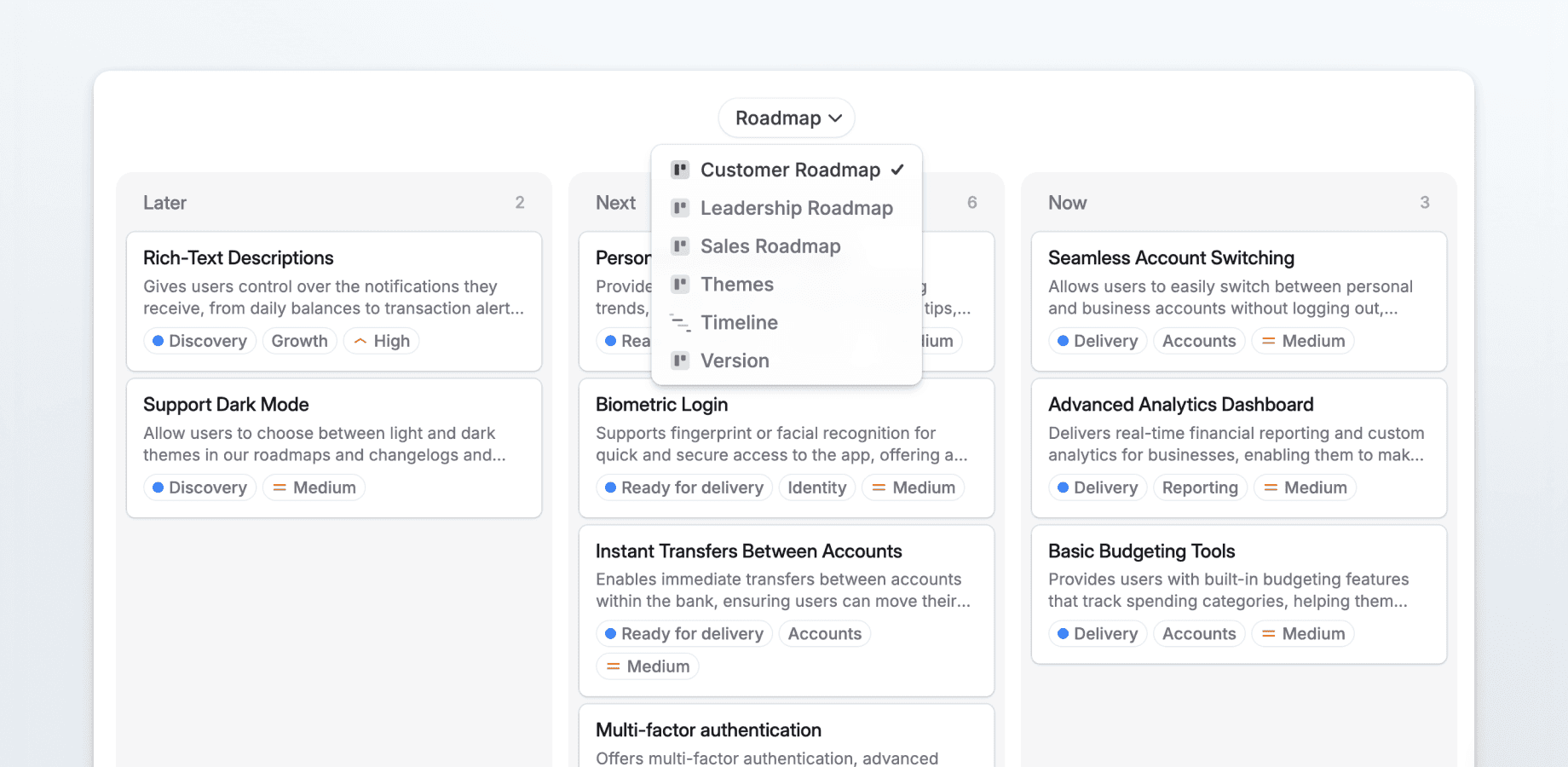
The Released Macro for Confluence solves this problem by embedding live Jira roadmaps and changelogs directly into Confluence pages. Stakeholders can view updates, comment on roadmap items, and route feedback back to the associated Jira ticket. No Jira license is required, and updates happen automatically.
This article explores how teams use live Jira integration in Confluence to improve visibility, collaboration, and release communication.
Giving Teams Self-Serve Access to Product Information
Sales, Customer Success, and Support teams rely on accurate product information to do their jobs. Small questions accumulate and interrupt workflows when teams must repeatedly ask product managers for updates.
Embedding a live roadmap in Confluence allows teams to check progress themselves. Sales can verify feature timelines before calls, Customer Success can guide clients on upcoming improvements, and Support can communicate fixes proactively.
Information becomes self-serve, reducing repetitive inquiries and ensuring conversations are grounded in a shared source of truth.
Streamline Stakeholder Reviews Without Slide Decks
Quarterly business reviews and steering committee meetings often rely on presentations built from Jira data. Preparing decks takes hours, and by the time meetings occur, parts of the content are outdated. Feedback arrives scattered via emails and chat.
With Released, you can embed the roadmap in Confluence. Stakeholders review updates ahead of meetings and leave comments directly on roadmap items. Feedback flows back to Jira tickets automatically, and discussions continue after the meeting without rebuilding slides each quarter.
This approach saves preparation time and keeps conversations focused on decisions rather than status recaps.
Collect Feedback From Non-Technical Stakeholders
Marketing, Legal, Finance, and Operations teams often have input on product direction but limited Jira access. Without easy options, feedback can be delayed or disconnected.
Confluence is already a hub where these teams collaborate. Embedding a roadmap there allows them to comment directly in context. Marketing can flag launch timing issues, Legal can raise compliance concerns, and Operations can identify workflow impacts.
Each comment links to the relevant Jira ticket, ensuring alignment and reducing follow-ups.
Tailor Roadmap Views for Different Audiences
Not every stakeholder needs the same level of detail. Executives want high-level outcomes and timelines, Engineering leaders care about dependencies, partners need visibility into integrations, and customers need clarity without internal context.
Released supports multiple views of the same Jira data. Each view can be embedded in a separate Confluence page for a specific audience. Updates propagate automatically because the data originates in Jira.
Teams maintain clarity without duplicating documents, and each audience sees exactly what they need.
Maintain Release Notes Automatically
Release notes are critical but often fall behind as teams ship features. Writing and formatting updates competes with development, leaving documentation incomplete.
Released generates draft release notes from completed Jira tickets. Embedding the changelog in Confluence transforms release notes into a continuously updated resource. Support teams can reference past changes, new hires can review product evolution, and Sales can use notes during renewals.
Release communication becomes part of the workflow rather than a separate task.
Connect Discovery Work to Delivery
Idea prioritization often loses visibility once execution starts. Workshop or research session participants may never see how their input is implemented.
Embedding a live roadmap in the discovery space links early discussions to delivery. Stakeholders can track ideas as they move through development, add context as requirements evolve, and see how contributions influence product outcomes. Transparency encourages engagement and ensures ideas have a clear impact.
Coordinate Cross-Functional Launches Efficiently
Launching a feature requires alignment across Product, Engineering, Marketing, Support, Enablement, and Documentation teams. Coordination often relies on Slack, spreadsheets, and recurring meetings, creating friction.
A Confluence launch page with an embedded roadmap provides a shared view. Each team sees real-time progress from Jira, and comments attach directly to roadmap items. Marketing can confirm readiness, Documentation can request clarifications, and Product teams can respond immediately.
This approach reduces the need for status meetings and keeps coordination visible in one place.
Why Embedding Jira Roadmaps in Confluence Works
Jira is where work happens, Confluence is where people collaborate. Separating execution from communication creates unnecessary work.
Live roadmaps remove the need to rebuild updates for different audiences. Stakeholders access information where they already work, feedback flows directly to the team, and Product Managers spend more time executing rather than reporting.
Adoption is seamless because nothing new is introduced. Teams continue using Jira for delivery and Confluence for collaboration, eliminating extra work.
FAQ About Released Roadmaps in Confluence
Can stakeholders view the roadmap without a Jira license?
Yes. The Confluence macro allows view-only access without a Jira account.
Can feedback left in Confluence update Jira tickets automatically?
Yes. Comments attach to the corresponding Jira ticket, keeping feedback in context.
How do I create different views for executives, engineering, and partners?
Released supports multiple portal views from the same Jira data. Each view can be embedded on its own Confluence page.
Is it possible to maintain release notes without manual updates?
Released generates draft release notes automatically from completed Jira tickets. Embedding the changelog in Confluence keeps the notes current.
Can teams track ideas from discovery through delivery?
Yes. Embedding the roadmap in discovery spaces shows progress on prioritized ideas, keeping contributors informed.
Article
Embed Jira Roadmaps in Confluence for Stakeholder Communication
Keep your teams aligned with real-time product updates
Managing a roadmap in Jira is straightforward, but sharing it across your organization isn’t. Stakeholders want updates, customer-facing teams need visibility, and release notes must be communicated. Exporting screenshots, building slides, or manually updating Confluence pages often results in outdated information.
The Released Macro for Confluence solves this problem by embedding live Jira roadmaps and changelogs directly into Confluence pages. Stakeholders can view updates, comment on roadmap items, and route feedback back to the associated Jira ticket. No Jira license is required, and updates happen automatically.
This article explores how teams use live Jira integration in Confluence to improve visibility, collaboration, and release communication.
Giving Teams Self-Serve Access to Product Information
Sales, Customer Success, and Support teams rely on accurate product information to do their jobs. Small questions accumulate and interrupt workflows when teams must repeatedly ask product managers for updates.
Embedding a live roadmap in Confluence allows teams to check progress themselves. Sales can verify feature timelines before calls, Customer Success can guide clients on upcoming improvements, and Support can communicate fixes proactively.
Information becomes self-serve, reducing repetitive inquiries and ensuring conversations are grounded in a shared source of truth.
Streamline Stakeholder Reviews Without Slide Decks
Quarterly business reviews and steering committee meetings often rely on presentations built from Jira data. Preparing decks takes hours, and by the time meetings occur, parts of the content are outdated. Feedback arrives scattered via emails and chat.
With Released, you can embed the roadmap in Confluence. Stakeholders review updates ahead of meetings and leave comments directly on roadmap items. Feedback flows back to Jira tickets automatically, and discussions continue after the meeting without rebuilding slides each quarter.
This approach saves preparation time and keeps conversations focused on decisions rather than status recaps.
Collect Feedback From Non-Technical Stakeholders
Marketing, Legal, Finance, and Operations teams often have input on product direction but limited Jira access. Without easy options, feedback can be delayed or disconnected.
Confluence is already a hub where these teams collaborate. Embedding a roadmap there allows them to comment directly in context. Marketing can flag launch timing issues, Legal can raise compliance concerns, and Operations can identify workflow impacts.
Each comment links to the relevant Jira ticket, ensuring alignment and reducing follow-ups.
Tailor Roadmap Views for Different Audiences
Not every stakeholder needs the same level of detail. Executives want high-level outcomes and timelines, Engineering leaders care about dependencies, partners need visibility into integrations, and customers need clarity without internal context.
Released supports multiple views of the same Jira data. Each view can be embedded in a separate Confluence page for a specific audience. Updates propagate automatically because the data originates in Jira.
Teams maintain clarity without duplicating documents, and each audience sees exactly what they need.
Maintain Release Notes Automatically
Release notes are critical but often fall behind as teams ship features. Writing and formatting updates competes with development, leaving documentation incomplete.
Released generates draft release notes from completed Jira tickets. Embedding the changelog in Confluence transforms release notes into a continuously updated resource. Support teams can reference past changes, new hires can review product evolution, and Sales can use notes during renewals.
Release communication becomes part of the workflow rather than a separate task.
Connect Discovery Work to Delivery
Idea prioritization often loses visibility once execution starts. Workshop or research session participants may never see how their input is implemented.
Embedding a live roadmap in the discovery space links early discussions to delivery. Stakeholders can track ideas as they move through development, add context as requirements evolve, and see how contributions influence product outcomes. Transparency encourages engagement and ensures ideas have a clear impact.
Coordinate Cross-Functional Launches Efficiently
Launching a feature requires alignment across Product, Engineering, Marketing, Support, Enablement, and Documentation teams. Coordination often relies on Slack, spreadsheets, and recurring meetings, creating friction.
A Confluence launch page with an embedded roadmap provides a shared view. Each team sees real-time progress from Jira, and comments attach directly to roadmap items. Marketing can confirm readiness, Documentation can request clarifications, and Product teams can respond immediately.
This approach reduces the need for status meetings and keeps coordination visible in one place.
Why Embedding Jira Roadmaps in Confluence Works
Jira is where work happens, Confluence is where people collaborate. Separating execution from communication creates unnecessary work.
Live roadmaps remove the need to rebuild updates for different audiences. Stakeholders access information where they already work, feedback flows directly to the team, and Product Managers spend more time executing rather than reporting.
Adoption is seamless because nothing new is introduced. Teams continue using Jira for delivery and Confluence for collaboration, eliminating extra work.
FAQ About Released Roadmaps in Confluence
Can stakeholders view the roadmap without a Jira license?
Yes. The Confluence macro allows view-only access without a Jira account.
Can feedback left in Confluence update Jira tickets automatically?
Yes. Comments attach to the corresponding Jira ticket, keeping feedback in context.
How do I create different views for executives, engineering, and partners?
Released supports multiple portal views from the same Jira data. Each view can be embedded on its own Confluence page.
Is it possible to maintain release notes without manual updates?
Released generates draft release notes automatically from completed Jira tickets. Embedding the changelog in Confluence keeps the notes current.
Can teams track ideas from discovery through delivery?
Yes. Embedding the roadmap in discovery spaces shows progress on prioritized ideas, keeping contributors informed.
Article
Embed Jira Roadmaps in Confluence for Stakeholder Communication
Keep your teams aligned with real-time product updates
Managing a roadmap in Jira is straightforward, but sharing it across your organization isn’t. Stakeholders want updates, customer-facing teams need visibility, and release notes must be communicated. Exporting screenshots, building slides, or manually updating Confluence pages often results in outdated information.
The Released Macro for Confluence solves this problem by embedding live Jira roadmaps and changelogs directly into Confluence pages. Stakeholders can view updates, comment on roadmap items, and route feedback back to the associated Jira ticket. No Jira license is required, and updates happen automatically.
This article explores how teams use live Jira integration in Confluence to improve visibility, collaboration, and release communication.
Giving Teams Self-Serve Access to Product Information
Sales, Customer Success, and Support teams rely on accurate product information to do their jobs. Small questions accumulate and interrupt workflows when teams must repeatedly ask product managers for updates.
Embedding a live roadmap in Confluence allows teams to check progress themselves. Sales can verify feature timelines before calls, Customer Success can guide clients on upcoming improvements, and Support can communicate fixes proactively.
Information becomes self-serve, reducing repetitive inquiries and ensuring conversations are grounded in a shared source of truth.
Streamline Stakeholder Reviews Without Slide Decks
Quarterly business reviews and steering committee meetings often rely on presentations built from Jira data. Preparing decks takes hours, and by the time meetings occur, parts of the content are outdated. Feedback arrives scattered via emails and chat.
With Released, you can embed the roadmap in Confluence. Stakeholders review updates ahead of meetings and leave comments directly on roadmap items. Feedback flows back to Jira tickets automatically, and discussions continue after the meeting without rebuilding slides each quarter.
This approach saves preparation time and keeps conversations focused on decisions rather than status recaps.
Collect Feedback From Non-Technical Stakeholders
Marketing, Legal, Finance, and Operations teams often have input on product direction but limited Jira access. Without easy options, feedback can be delayed or disconnected.
Confluence is already a hub where these teams collaborate. Embedding a roadmap there allows them to comment directly in context. Marketing can flag launch timing issues, Legal can raise compliance concerns, and Operations can identify workflow impacts.
Each comment links to the relevant Jira ticket, ensuring alignment and reducing follow-ups.
Tailor Roadmap Views for Different Audiences
Not every stakeholder needs the same level of detail. Executives want high-level outcomes and timelines, Engineering leaders care about dependencies, partners need visibility into integrations, and customers need clarity without internal context.
Released supports multiple views of the same Jira data. Each view can be embedded in a separate Confluence page for a specific audience. Updates propagate automatically because the data originates in Jira.
Teams maintain clarity without duplicating documents, and each audience sees exactly what they need.
Maintain Release Notes Automatically
Release notes are critical but often fall behind as teams ship features. Writing and formatting updates competes with development, leaving documentation incomplete.
Released generates draft release notes from completed Jira tickets. Embedding the changelog in Confluence transforms release notes into a continuously updated resource. Support teams can reference past changes, new hires can review product evolution, and Sales can use notes during renewals.
Release communication becomes part of the workflow rather than a separate task.
Connect Discovery Work to Delivery
Idea prioritization often loses visibility once execution starts. Workshop or research session participants may never see how their input is implemented.
Embedding a live roadmap in the discovery space links early discussions to delivery. Stakeholders can track ideas as they move through development, add context as requirements evolve, and see how contributions influence product outcomes. Transparency encourages engagement and ensures ideas have a clear impact.
Coordinate Cross-Functional Launches Efficiently
Launching a feature requires alignment across Product, Engineering, Marketing, Support, Enablement, and Documentation teams. Coordination often relies on Slack, spreadsheets, and recurring meetings, creating friction.
A Confluence launch page with an embedded roadmap provides a shared view. Each team sees real-time progress from Jira, and comments attach directly to roadmap items. Marketing can confirm readiness, Documentation can request clarifications, and Product teams can respond immediately.
This approach reduces the need for status meetings and keeps coordination visible in one place.
Why Embedding Jira Roadmaps in Confluence Works
Jira is where work happens, Confluence is where people collaborate. Separating execution from communication creates unnecessary work.
Live roadmaps remove the need to rebuild updates for different audiences. Stakeholders access information where they already work, feedback flows directly to the team, and Product Managers spend more time executing rather than reporting.
Adoption is seamless because nothing new is introduced. Teams continue using Jira for delivery and Confluence for collaboration, eliminating extra work.
FAQ About Released Roadmaps in Confluence
Can stakeholders view the roadmap without a Jira license?
Yes. The Confluence macro allows view-only access without a Jira account.
Can feedback left in Confluence update Jira tickets automatically?
Yes. Comments attach to the corresponding Jira ticket, keeping feedback in context.
How do I create different views for executives, engineering, and partners?
Released supports multiple portal views from the same Jira data. Each view can be embedded on its own Confluence page.
Is it possible to maintain release notes without manual updates?
Released generates draft release notes automatically from completed Jira tickets. Embedding the changelog in Confluence keeps the notes current.
Can teams track ideas from discovery through delivery?
Yes. Embedding the roadmap in discovery spaces shows progress on prioritized ideas, keeping contributors informed.
Use cases
Resources
Backed by


Use cases
Backed by
Use cases
Resources
Backed by