Article
How to Build a Lightweight Product Roadmap
How we keep our product roadmap simple, public, and useful


We’ve talked to a lot of teams who struggle with roadmaps. Not the strategy part. The actual process of putting one together, keeping it up to date, and sharing it publicly. It ends up feeling like a side project on top of your actual work.
So we figured we’d just share how we do it. It’s not perfect, but it’s working for us. And the main reason it works is that we’ve kept it simple.
Keep it simple
Most roadmap processes break down because teams treat them like commitments. Detailed timelines, locked-in scopes, delivery dates carved in stone. That works until priorities shift. And priorities always shift.
We think about our roadmap in three horizons:
Next 4 weeks: Clear picture. We know what we’re building and roughly when it ships.
Next 3 months: Rough shape. We know the problems we want to solve, but the solutions might shift.
Next 6–12 months: Directional. Big themes and bets, not feature specs.
The further out you go, the less detail you should have. If your roadmap has the same level of specificity at 6 months as it does at 4 weeks, you’re over-planning.
Every business is different, so those exact windows might vary. A hardware company might need longer horizons. A small startup might only plan 2 weeks ahead. Match your level of detail to your level of certainty.
The anti-patterns we’ve seen
A few things that tend to trip teams up early:
Too much detail, too soon. Writing full specs for work that’s 6 months is just busy work. Most of it gets thrown away when priorities shift. Save the detail for when you’re actually close to building.
Treating the roadmap as a promise. If your customers (or your team) read “on the roadmap” as “definitely happening exactly like this,” you’ve got a communication problem. The language you use matters. More on that below.
Using Jira as a feedback inbox. The default instinct is to create a ticket for every customer request. The problem is that you end up with hundreds of duplicate tickets and no easy way to talk to the person who made the request. Your backlog becomes a graveyard.
This is how we do it
Feedback comes in through an inbox, not jira tickets
All our customer feedback — from Slack, our public roadmap, in-app feedback — lands in a centralized inbox in Released. Unlike Jira, it’s a two-way conversation. We can ask follow-up questions, clarify the pain point, and keep the customer in the loop.
Think of it the inbox as a reception desk, not a filing cabinet.
We don’t create a roadmap item for every request. We wait until we hear the same pain point a few times. Once a pattern shows up, we bundle those feedback items into a single idea in Jira Product Discovery.
Organizing Ideas by Product Area
Once an idea lands in Jira Product Discovery, we categorize it into a product area. Think high level areas like “Roadmap,” “Portal,” or “Changelog.” This gives us a quick gut check on where we’re spending our energy. If 80% of our ideas are stacking up in one area but our focus for the quarter is somewhere else, that’s worth a conversation.
We track a few simple attributes for each idea:
Field | What It Does |
|---|---|
Status | Where it sits in our workflow (Discovery, Planned, etc.) |
Public (Toggle) | Whether customers can see it |
Goal | Which business objective it supports |
Effort | How much work will be involved in delivering the idea |
Confidence | How sure we are about the impact, based on feedback volume, customer conversations and market understanding |
Tying Everything to Goals
Every roadmap item maps to a business goal for the quarter. Things like “Increase feedback volume” or “Reduce churn.” If an idea doesn’t connect to a goal, it stays in the gathering-feedback stage until it does.
Instead of a feature list, you end up with a set of problems you’re trying to solve. Different way to look at a roadmap.
A Lightweight Prioritization Score

We rank ideas with a simple formula:
Impact Score = (Goal Impact × Confidence) / Effort
Confidence is driven by the actual feedback we’ve collected. That includes the feedback messages and wish count – how many people have wished for an item. Obviously an idea with dozens of linked customer conversations scores higher than one we’ve heard about once. But if you don't get hundreds of feedback messages each week, don't rely too much on numbers. Instead, pay attention to the quality of the feedback.
The score is a starting point. We always look for items that work well together. Sometimes a group of medium-scoring ideas creates a better release than one high-scoring item on its own.
Planning what's coming up
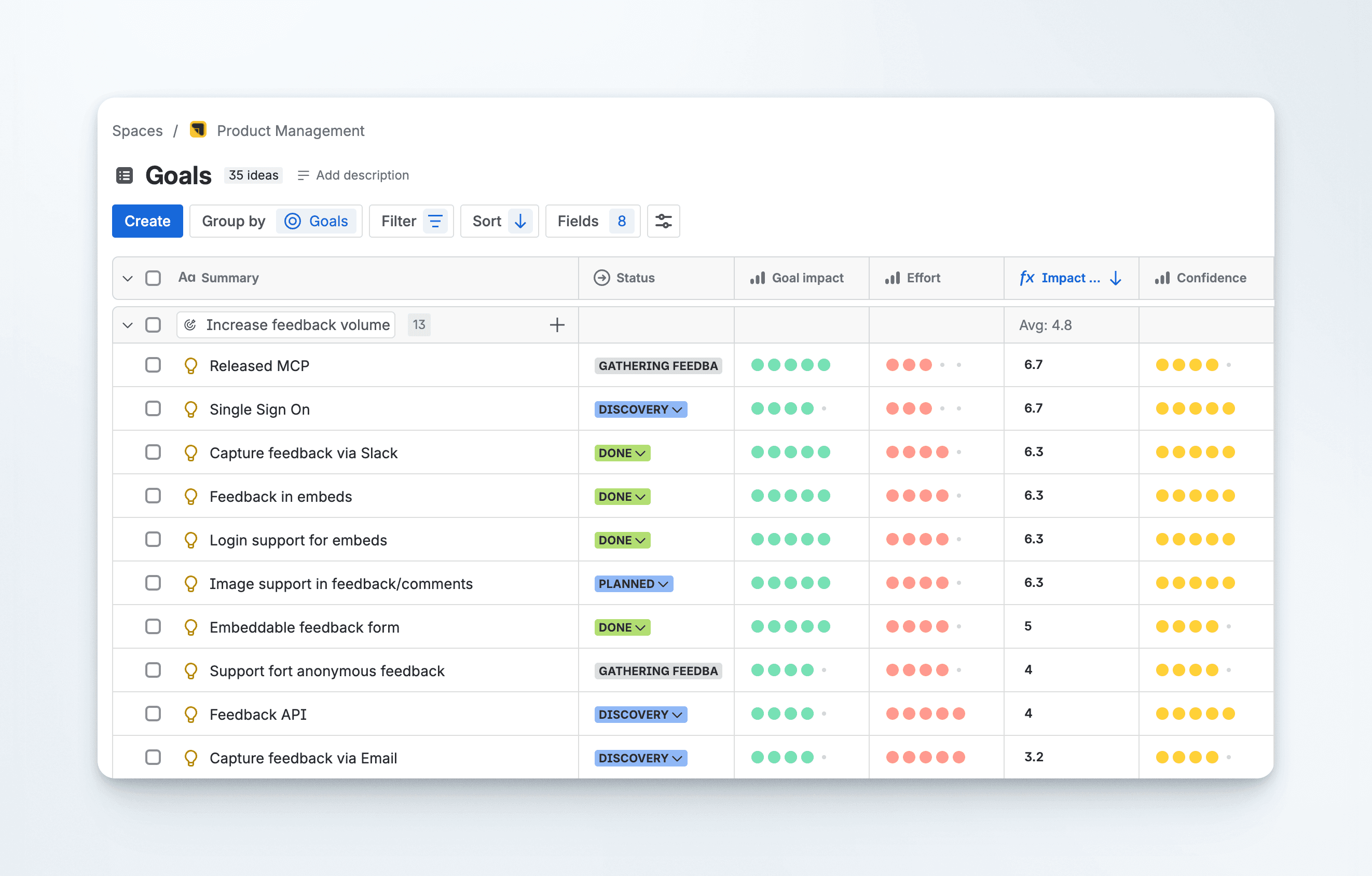
Now that we have most features linked to goals and an impact score associated with each, we can create a list view in Jira Product Discovery to help us plan our next steps.
The list view is organized as follows:
Grouped by: Goal
Sorted by: Impact score
This provides a clear overview of the biggest opportunities for each of our goals. Here, a bit of intuition comes into play. You don't have to strictly follow the list from top to bottom. For technical reasons, it might be better to address an item further down the list first. Perhaps a large customer has been waiting for a specific feature, and we can prioritize it. My point is that the impact score serves as a guide or suggestion, not a strict rule.
Communicating the Roadmap Publicly
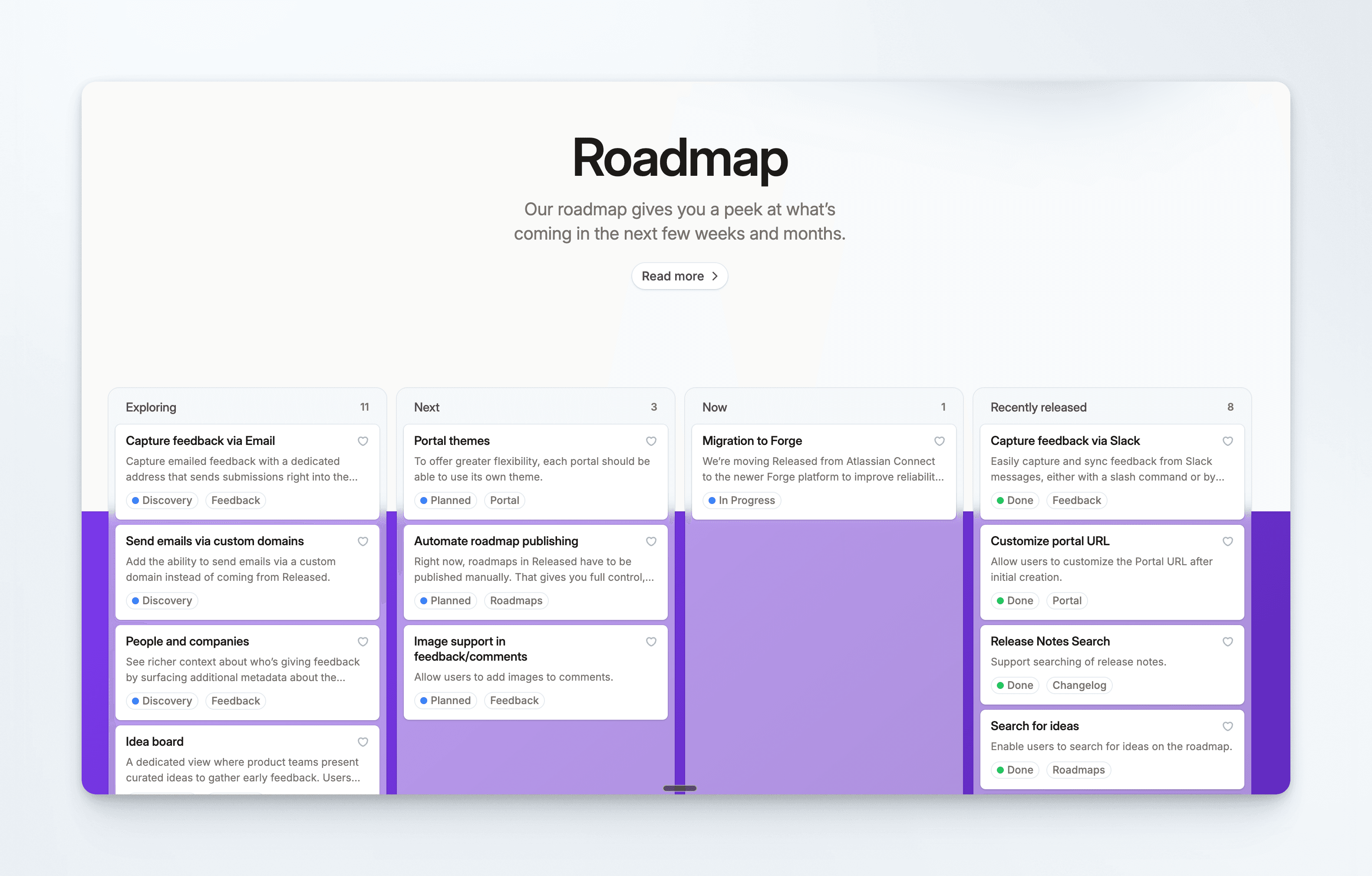
We map our internal statuses to public labels that set the right expectations:
What Customers See | What We Call It Internally | What It Signals |
|---|---|---|
Exploring | Discovery | We’re researching the problem. Nothing is locked in. |
Next | Planned | It’s scoped and queued for engineering. |
Now | In Progress | We’re actively building it. |
Recently Released | Done | It’s live. |
Calling our Discovery phase “Exploring” is deliberate. It tells customers we’re looking at the problem without promising a specific solution. Avoids the “but you said you’d build X” conversation.
Closing the Loop
We update our public roadmap once a week, usually alongside our release cycle. Because the whole workflow lives in the same system, feedback inbox to Jira Product Discovery to public roadmap, there’s very little manual overhead.
When something ships, we can go back to the customers who originally asked for it and let them know. We can do that because we kept the feedback connected to people from the start, rather than burying it in anonymous Jira tickets.
If you take one thing away
Start simple. You don’t need a scoring formula or a public roadmap on day one. You need a clear picture of what you’re working on now, a rough idea of what’s next, and the discipline to not over-plan the stuff that’s far out.
Your roadmap shouldn’t be a separate document you maintain, it should reflect the work that’s already happening. And it shouldn’t be set in stone.
Article
How to Build a Lightweight Product Roadmap
How we keep our product roadmap simple, public, and useful
We’ve talked to a lot of teams who struggle with roadmaps. Not the strategy part. The actual process of putting one together, keeping it up to date, and sharing it publicly. It ends up feeling like a side project on top of your actual work.
So we figured we’d just share how we do it. It’s not perfect, but it’s working for us. And the main reason it works is that we’ve kept it simple.
Keep it simple
Most roadmap processes break down because teams treat them like commitments. Detailed timelines, locked-in scopes, delivery dates carved in stone. That works until priorities shift. And priorities always shift.
We think about our roadmap in three horizons:
Next 4 weeks: Clear picture. We know what we’re building and roughly when it ships.
Next 3 months: Rough shape. We know the problems we want to solve, but the solutions might shift.
Next 6–12 months: Directional. Big themes and bets, not feature specs.
The further out you go, the less detail you should have. If your roadmap has the same level of specificity at 6 months as it does at 4 weeks, you’re over-planning.
Every business is different, so those exact windows might vary. A hardware company might need longer horizons. A small startup might only plan 2 weeks ahead. Match your level of detail to your level of certainty.
The anti-patterns we’ve seen
A few things that tend to trip teams up early:
Too much detail, too soon. Writing full specs for work that’s 6 months is just busy work. Most of it gets thrown away when priorities shift. Save the detail for when you’re actually close to building.
Treating the roadmap as a promise. If your customers (or your team) read “on the roadmap” as “definitely happening exactly like this,” you’ve got a communication problem. The language you use matters. More on that below.
Using Jira as a feedback inbox. The default instinct is to create a ticket for every customer request. The problem is that you end up with hundreds of duplicate tickets and no easy way to talk to the person who made the request. Your backlog becomes a graveyard.
This is how we do it
Feedback comes in through an inbox, not jira tickets
All our customer feedback — from Slack, our public roadmap, in-app feedback — lands in a centralized inbox in Released. Unlike Jira, it’s a two-way conversation. We can ask follow-up questions, clarify the pain point, and keep the customer in the loop.
Think of it the inbox as a reception desk, not a filing cabinet.
We don’t create a roadmap item for every request. We wait until we hear the same pain point a few times. Once a pattern shows up, we bundle those feedback items into a single idea in Jira Product Discovery.
Organizing Ideas by Product Area
Once an idea lands in Jira Product Discovery, we categorize it into a product area. Think high level areas like “Roadmap,” “Portal,” or “Changelog.” This gives us a quick gut check on where we’re spending our energy. If 80% of our ideas are stacking up in one area but our focus for the quarter is somewhere else, that’s worth a conversation.
We track a few simple attributes for each idea:
Field | What It Does |
|---|---|
Status | Where it sits in our workflow (Discovery, Planned, etc.) |
Public (Toggle) | Whether customers can see it |
Goal | Which business objective it supports |
Effort | How much work will be involved in delivering the idea |
Confidence | How sure we are about the impact, based on feedback volume, customer conversations and market understanding |
Tying Everything to Goals
Every roadmap item maps to a business goal for the quarter. Things like “Increase feedback volume” or “Reduce churn.” If an idea doesn’t connect to a goal, it stays in the gathering-feedback stage until it does.
Instead of a feature list, you end up with a set of problems you’re trying to solve. Different way to look at a roadmap.
A Lightweight Prioritization Score
We rank ideas with a simple formula:
Impact Score = (Goal Impact × Confidence) / Effort
Confidence is driven by the actual feedback we’ve collected. That includes the feedback messages and wish count – how many people have wished for an item. Obviously an idea with dozens of linked customer conversations scores higher than one we’ve heard about once. But if you don't get hundreds of feedback messages each week, don't rely too much on numbers. Instead, pay attention to the quality of the feedback.
The score is a starting point. We always look for items that work well together. Sometimes a group of medium-scoring ideas creates a better release than one high-scoring item on its own.
Planning what's coming up
Now that we have most features linked to goals and an impact score associated with each, we can create a list view in Jira Product Discovery to help us plan our next steps.
The list view is organized as follows:
Grouped by: Goal
Sorted by: Impact score
This provides a clear overview of the biggest opportunities for each of our goals. Here, a bit of intuition comes into play. You don't have to strictly follow the list from top to bottom. For technical reasons, it might be better to address an item further down the list first. Perhaps a large customer has been waiting for a specific feature, and we can prioritize it. My point is that the impact score serves as a guide or suggestion, not a strict rule.
Communicating the Roadmap Publicly
We map our internal statuses to public labels that set the right expectations:
What Customers See | What We Call It Internally | What It Signals |
|---|---|---|
Exploring | Discovery | We’re researching the problem. Nothing is locked in. |
Next | Planned | It’s scoped and queued for engineering. |
Now | In Progress | We’re actively building it. |
Recently Released | Done | It’s live. |
Calling our Discovery phase “Exploring” is deliberate. It tells customers we’re looking at the problem without promising a specific solution. Avoids the “but you said you’d build X” conversation.
Closing the Loop
We update our public roadmap once a week, usually alongside our release cycle. Because the whole workflow lives in the same system, feedback inbox to Jira Product Discovery to public roadmap, there’s very little manual overhead.
When something ships, we can go back to the customers who originally asked for it and let them know. We can do that because we kept the feedback connected to people from the start, rather than burying it in anonymous Jira tickets.
If you take one thing away
Start simple. You don’t need a scoring formula or a public roadmap on day one. You need a clear picture of what you’re working on now, a rough idea of what’s next, and the discipline to not over-plan the stuff that’s far out.
Your roadmap shouldn’t be a separate document you maintain, it should reflect the work that’s already happening. And it shouldn’t be set in stone.
Article
How to Build a Lightweight Product Roadmap
How we keep our product roadmap simple, public, and useful
We’ve talked to a lot of teams who struggle with roadmaps. Not the strategy part. The actual process of putting one together, keeping it up to date, and sharing it publicly. It ends up feeling like a side project on top of your actual work.
So we figured we’d just share how we do it. It’s not perfect, but it’s working for us. And the main reason it works is that we’ve kept it simple.
Keep it simple
Most roadmap processes break down because teams treat them like commitments. Detailed timelines, locked-in scopes, delivery dates carved in stone. That works until priorities shift. And priorities always shift.
We think about our roadmap in three horizons:
Next 4 weeks: Clear picture. We know what we’re building and roughly when it ships.
Next 3 months: Rough shape. We know the problems we want to solve, but the solutions might shift.
Next 6–12 months: Directional. Big themes and bets, not feature specs.
The further out you go, the less detail you should have. If your roadmap has the same level of specificity at 6 months as it does at 4 weeks, you’re over-planning.
Every business is different, so those exact windows might vary. A hardware company might need longer horizons. A small startup might only plan 2 weeks ahead. Match your level of detail to your level of certainty.
The anti-patterns we’ve seen
A few things that tend to trip teams up early:
Too much detail, too soon. Writing full specs for work that’s 6 months is just busy work. Most of it gets thrown away when priorities shift. Save the detail for when you’re actually close to building.
Treating the roadmap as a promise. If your customers (or your team) read “on the roadmap” as “definitely happening exactly like this,” you’ve got a communication problem. The language you use matters. More on that below.
Using Jira as a feedback inbox. The default instinct is to create a ticket for every customer request. The problem is that you end up with hundreds of duplicate tickets and no easy way to talk to the person who made the request. Your backlog becomes a graveyard.
This is how we do it
Feedback comes in through an inbox, not jira tickets
All our customer feedback — from Slack, our public roadmap, in-app feedback — lands in a centralized inbox in Released. Unlike Jira, it’s a two-way conversation. We can ask follow-up questions, clarify the pain point, and keep the customer in the loop.
Think of it the inbox as a reception desk, not a filing cabinet.
We don’t create a roadmap item for every request. We wait until we hear the same pain point a few times. Once a pattern shows up, we bundle those feedback items into a single idea in Jira Product Discovery.
Organizing Ideas by Product Area
Once an idea lands in Jira Product Discovery, we categorize it into a product area. Think high level areas like “Roadmap,” “Portal,” or “Changelog.” This gives us a quick gut check on where we’re spending our energy. If 80% of our ideas are stacking up in one area but our focus for the quarter is somewhere else, that’s worth a conversation.
We track a few simple attributes for each idea:
Field | What It Does |
|---|---|
Status | Where it sits in our workflow (Discovery, Planned, etc.) |
Public (Toggle) | Whether customers can see it |
Goal | Which business objective it supports |
Effort | How much work will be involved in delivering the idea |
Confidence | How sure we are about the impact, based on feedback volume, customer conversations and market understanding |
Tying Everything to Goals
Every roadmap item maps to a business goal for the quarter. Things like “Increase feedback volume” or “Reduce churn.” If an idea doesn’t connect to a goal, it stays in the gathering-feedback stage until it does.
Instead of a feature list, you end up with a set of problems you’re trying to solve. Different way to look at a roadmap.
A Lightweight Prioritization Score
We rank ideas with a simple formula:
Impact Score = (Goal Impact × Confidence) / Effort
Confidence is driven by the actual feedback we’ve collected. That includes the feedback messages and wish count – how many people have wished for an item. Obviously an idea with dozens of linked customer conversations scores higher than one we’ve heard about once. But if you don't get hundreds of feedback messages each week, don't rely too much on numbers. Instead, pay attention to the quality of the feedback.
The score is a starting point. We always look for items that work well together. Sometimes a group of medium-scoring ideas creates a better release than one high-scoring item on its own.
Planning what's coming up
Now that we have most features linked to goals and an impact score associated with each, we can create a list view in Jira Product Discovery to help us plan our next steps.
The list view is organized as follows:
Grouped by: Goal
Sorted by: Impact score
This provides a clear overview of the biggest opportunities for each of our goals. Here, a bit of intuition comes into play. You don't have to strictly follow the list from top to bottom. For technical reasons, it might be better to address an item further down the list first. Perhaps a large customer has been waiting for a specific feature, and we can prioritize it. My point is that the impact score serves as a guide or suggestion, not a strict rule.
Communicating the Roadmap Publicly
We map our internal statuses to public labels that set the right expectations:
What Customers See | What We Call It Internally | What It Signals |
|---|---|---|
Exploring | Discovery | We’re researching the problem. Nothing is locked in. |
Next | Planned | It’s scoped and queued for engineering. |
Now | In Progress | We’re actively building it. |
Recently Released | Done | It’s live. |
Calling our Discovery phase “Exploring” is deliberate. It tells customers we’re looking at the problem without promising a specific solution. Avoids the “but you said you’d build X” conversation.
Closing the Loop
We update our public roadmap once a week, usually alongside our release cycle. Because the whole workflow lives in the same system, feedback inbox to Jira Product Discovery to public roadmap, there’s very little manual overhead.
When something ships, we can go back to the customers who originally asked for it and let them know. We can do that because we kept the feedback connected to people from the start, rather than burying it in anonymous Jira tickets.
If you take one thing away
Start simple. You don’t need a scoring formula or a public roadmap on day one. You need a clear picture of what you’re working on now, a rough idea of what’s next, and the discipline to not over-plan the stuff that’s far out.
Your roadmap shouldn’t be a separate document you maintain, it should reflect the work that’s already happening. And it shouldn’t be set in stone.
Use cases
Resources
Backed by


Use cases
Backed by
Use cases
Resources
Backed by